Surname Study and AI Part 5: Adding City Directories
In this series of posts about a surname study, Part 1 described the study, Part 2 included how census data was collected and formatted for use and Part 3 described how to combine and analyze the census data. Part 4 showed how to create a project as part of a surname study (or any any task you are doing). In this part, adding collecting and adding data from city directories to the surname study will be discussed.
When I was approaching this project without AI, I had gathered many records. I had compiled them in spreadsheets, planning to do analysis. Since I am a visual person, the data I collected was compiled in PowerPoint slides with graphics. That meant that I the collected data in a spreadsheet.
Capturing the city directory data for the four cities with directories that listed Gilroys from 1850-1900 took some thought. By its nature, the tables in the spreadsheet were not completely populated; I only had data for years that I could find directories and could only fill in the table when a person was listed in the directory. There had been movement of Gilroys between cities, too.
Since the data collection had been a while ago, I had a chance to revisit Ancestry.com to see if there had been additional city directories added to the database. Spoiler alert: there had. I also used ChatGPT’s services to collect sources for the actual city directories that appear online. This helped, and in some cases I used data from House Directory and Family Address Books.
While ChatGPT and I worked on defining and refining the product, it became important for me to redesign the spreadsheet of city directory data in a different, and more uniform pattern. I was careful to separate out people with the same name, treating them as different individuals until there was confirmation that they could combined into being records for the same person. I experimented with filling in the blank cells of the spreadsheet with a dash, but in the end, leaving the empty cells blank worked better.
The final spreadsheet was all in one worksheet, but had four separate sections for the cities in Rhode Island where I had located Gilroys: Newport, Providence, Westerly and Bristol. There pairs of columns for each entry with occupation and address. Above those headers, I merged the cells to enter the year. Above the year was a brief title for the source, with the page numbers. As you can imagine, the spreadsheet had many columns.
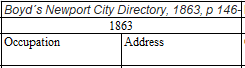
For me, it was important to know that ChatGPT was using all the data in the spreadsheet, so I had it create a listing based on each entry (name, year, occupation, address). I then verified that all the individuals that I had input were being seen by ChatGPT. A complication arose. Even though I uploaded the spreadsheet with the revised city directory entries into the Project, ChatGPT told me that it could not access the spreadsheet. It suggested that I post a screenshot, or the cells, to accompany my questions. So I did.
At the end of ironing out the directions for this task, based on the output, I asked ChatGPT to provide a prompt that would have created a list with all the collected data for me. In the end, I added two columns to this integrity checking spreadsheet: a number to correspond with the individual in the row of the spreadsheet, and a number referencing the source of the data. We also decided it was best for ChatGPT to take in one city at a time, then have me verify that it had the entries before doing the analysis.
ChatGPT created a very detailed reusable prompt with sections describing for the following subtasks:
- Work by city section only
- Preserve spreadsheet row order exactly
- Extract strictly left to right
- Use exact visible cell text only
- Output format
- Add source list below each city table Include abbreviation notes
- Mandatory verification stop
A report correlating the city directories with the census data was generated. Four families were identified as units, and the backbone of the migration of Gilroys was hypothesized. I then asked for additional insights. I reminded ChatGPT about the single women who came before the families, and they were also discussed. I also had lists of all the people found in the city directories printed by city to include in an appendix.
A lot of the push-pull between ChatGPT during the creation of a report was the fact that it seemed to want to talk about the report more than create it. I had to guide it to create a product more through this task than through the previous one. Honestly, the effort to manually reformat and check the data did help me get immersed in the data in a way that telling someone, or an AI, to collect and analyze data would ever do. (Being hands-on also helped me to combine data during the next phase when I was collecting vital records data.)
In its crosswalk through the city directory data and census data, ChatGPT now had five strong lines. It also saw the connections between parts of the family and addresses. There were clusters on streets: Burn’s Court / Byrnes Court cluster in Newport, and Manton Avenue in Providence. The census where Timothy and Eliza were in Providence were correlated to directory entry for him Manton Avenue. That address was also one where my great-grandfather would live after his parents’ deaths. (More on that story after vital records.) This work may be laying groundwork for chain migration!
Although I know more about the family at this point than ChatGPT (until I add vital records data), I became excited because the married women were speaking through their husbands’ entries! The power of combining different types of records by compiling them was becoming more obvious.
I knew Timothy and Eliza were married in Newport and died there. However, from the census work, I knew that there was a RI Census showing them living in Providence. After looking at the addresses in Providence, I opened up a new chat within the project and asked about the street where Timothy-Eliza family members lived before and after the immigrant couple’s deaths. This opened up understanding of the historical context of Manton Avenue in Providence, RI.
Other Gilroy families also lived in streets around this industrial area that was home to several mills. ChatGPT shared that this was a likely destination for internal migration within Rhode Island. After Timothy and Eliza’s death, my great-grandfather lived and worked in Providence. He lived at the same address as William Patrick Rafferty, who had married Katie Josephine Gilroy (Timothy and Eliza’s daughter) in Newport in 1889. They would later move to Long Island, NY. The Manton Avenue connection became more intriguing. In a separate conversation, I asked ChatGPT:
Tell me about Providence, RI Manton Avenue in the 1850-1900 timeframe
This conversation was illuminating, as part of the answer was: “By 1850–1900, it had become one of the city’s major mill and worker-residential corridors.” Mills in the area were named as were streets in the area.
Since ChatGPT had been trained on Gilroy data, unsurprisingly ChatGPT asked:
“Would you like me to help analyze whether any of your Providence Gilroy directory entries fall near Manton Avenue or the Olneyville mill corridor?”
Yes, look especially at city directory entries for these addresses and occupations
ChatGPT gave a listing of the addresses, and explained which streets in those addresses were all within walking distance of each other. It gave me its insight that family members within the a few blocks might be indicators of chain migration, sibling households, and a kin boarding network. This
At the end of this step:
I had created a table with the city directory entries that had been located, by year, for people named Gilroy in the Rhode Island cities of Newport, Providence, Westerly and Bristol. The spreadsheet contained the occupation and address for each person, by year as well as the name of the reference.
ChatGPT had generated a report: Gilroy City Directories Analysis Report With Timelines And Census Correlation, Rhode Island (Newport, Bristol, Providence, Westerly), 1850–1900. There were also separate sections to add to an appendix with all listings of people with the name Gilroy from the cities Newport, Providence, Westerly and Bristol.
More than that, I had a better understanding of a neighborhood in Providence that may be a nexus for my immigrant family.
The way to tie these individuals together would be vital records, so I was eager to move forward to them. I just had to review the data I had, capture data if needed, organize it logically and load it into ChatGPT.