Surname Study and AI Part 2: Collecting Census Data

blog banner - Surname Study and AI
Part 2

In the Surname Study and AI Part 1 post, I described the reasons that motivated me to undertake a surname study in Rhode Island, US, and the approach I took. The use of AI tools to help with formatting, visualizing and analyzing data is a goal in this latest iteration of the project.

Both US Population and Rhode Island State Census data were used as a backbone for the study.

My next step was to use AI to capture the transcriptions of key record information from the censuses, and work to normalize it. For this first step, I decided to limit my search to census databases, for exact and similar spelling of the surname, using the exact location of Rhode Island, USA. Even though I collected the images of the census, I collected the data presented on the Record Page to populate the columns of the spreadsheet.

My search settings were:

Last name: Gilroy; Slider: Exact and similar

Lived in: Rhode Island, USA ; Slider: Exact

Focus: United States [this setting was not necessary because I searched for records specific to the United States and Rhode Island]

On the search results page, I used filters to narrow down to one census at a time so that I could collect the data.

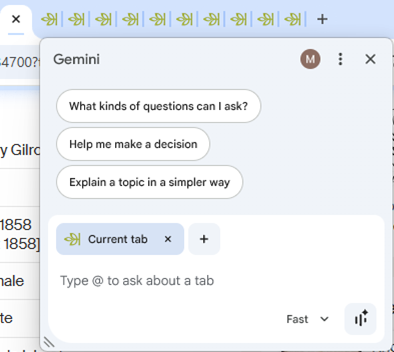
Thanks to a great idea I learned from Jon Smith of the North Carolina Genealogical Society, I decided to use Ancestry.com in a Chrome browser with Gemini AI enabled to capture the Record pages.

Gemini in top of Chrome Browser

If you do not see Gemini on the top of Chrome:

First, be sure that you are logged into your Google account. You can do this by logging into your Gmail account in the browser.

Then, try this to enable Gemini in Chrome:

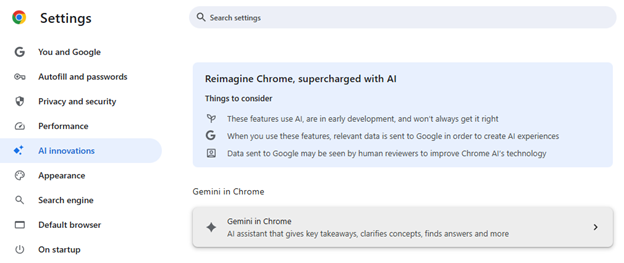
Click the three dots (More), and select Settings from the menu

In Settings, click AI innovations in the left menu, then select Gemini in Chrome.

Chrome Settings to use Gemini
Chrome Preference to open Gemini

To collect the data in the US Census, I signed into HeritageQuest in the Chrome browser. Always check your county library, as HeritageQuest may be free to access from home.

I searched for all the occurrences of the surname in Rhode Island, one census at a time for the 1850, 1870, 1880 and 1900 US Censuses. My plan was to collect one line of data for each name that appeared in the search results.

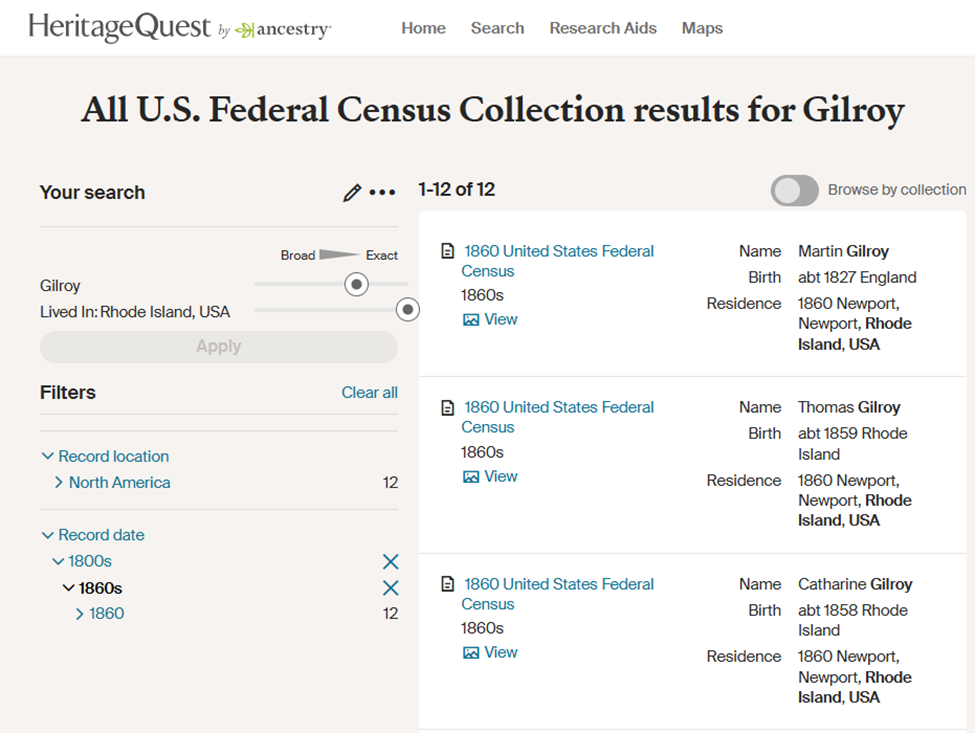
These are example results for the search for exact and similar surnames to Gilroy.

Example HeritageQuest Search Results Page

Example Search Results Page (courtesy HeritageQuest.com)

From the 1860 US Census Search Results Page, I right clicked on the View button to open each Record in a new tab.

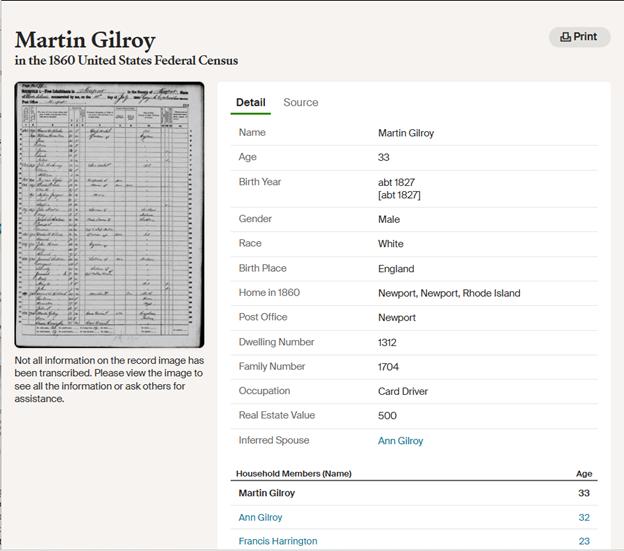
Example HeritageQuest Record Page

Example Record Page (courtesy HeritageQuest.com)

Gemini in top of Chrome Browser

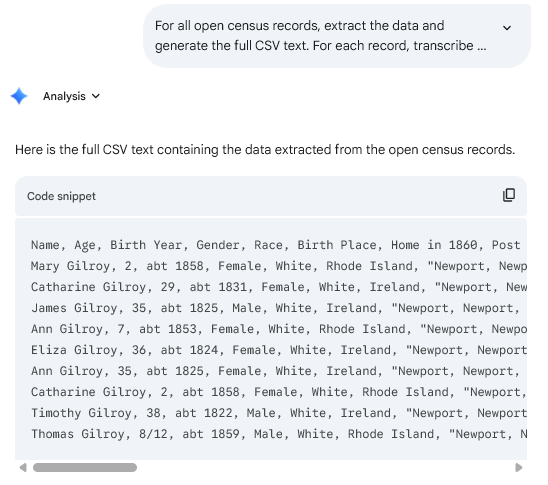
Some of the issues and limitations that I found may be due to the fact that I use a free version of Gemini. I had to work on my prompt to have the data captured in a Comma Separated Values (csv) format, so that I could use the data from the transcription of the record in my Excel spreadsheet. I tried to have Gemini decide what to label the columns, but it worked out better when I told it the names of the columns in the prompt.

NOTE: Later on, Gemini and I decided to format the collected data in Markdown tables. This simplified the process, because the data could be pasted directly into the Excel worksheet.

In the interest of time, I used copied all the data from one Record page and asked ChatGPT to extract the data tags, using the prompt:

keep only the data tags such as Name, Age, etc and show them in a comma separated sentence on one line.

That provided me with column names which could then be used in the Gemini prompt. (This was done once for each census.) That way the line for each enumerated person in a worksheet would have the same data in the same columns.

In my type of account (free), Gemini would only look at ten open tabs in the Chrome browser as input to a prompt, so I knew that I would have to collect the data in steps. Gemini wanted to jump right in and give me analysis based on the data in those tabs, and it took some coaxing through prompt refinement to get the data in a form to put into a spreadsheet.

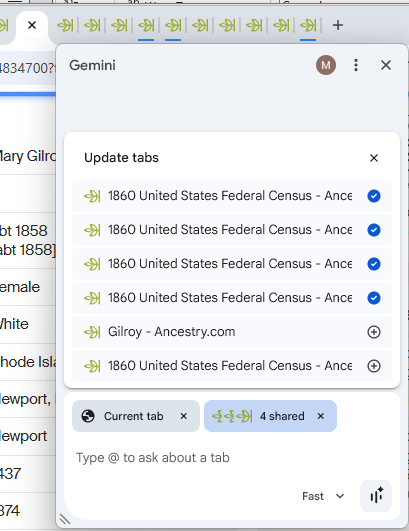
I added tabs using the plus sign until I had selected the Current tab and 9 others to share with Gemini. (When you select more than 10 tabs a warning appears: “Only 10 tabs can be shared.”

Select Multiple Tabs as Input to the Gemini Prompt in Chrome Browser

Select Multiple Tabs as Input to the Gemini Prompt in Chrome Browser

Prompts may need refinement, and in this case Gemini and I chatted back and forth to get the results that I wanted. Gemini warned me that it could not directly create or download an Excel (.xlsx) file for me, but that it could format the data into a standard CSV (Comma Separated Values) format.

For the 1860 US Census, this is a prompt that I used in Gemini in the Chrome browser. This was the result of refinement, and needed to be changed slightly for each census.

For all open census records, extract the data and generate the full CSV text. For each record, transcribe it into a new row of the CSV . Put the CSV text in a canvas so that I can copy it from the prompt. Structure the output so that each record (the main person detailed on the page) is a single row, and list all their household members’ names in a single column titled ‘Other Household Members (Names)’. **Only transcribe data explicitly visible in the current tab’s detail and household sections.**

Here are only the data tags, formatted as a single comma-separated line:

Name, Age, Birth Year, Gender, Race, Birth Place, Home in 1860, Post Office, Dwelling Number, Family Number, Occupation, Real Estate Value, Inferred Spouse, Household Members (Name)

**For any column field where data is not transcribed, insert a blank space to ensure all records have identical column structures.**

The response included this CSV text.

CSV from the Gemini Canvas

I used the copy icon at the top right to capture the CSV text, and pasted it into an open Notepad file. The Notepad file was saved as type “All files” and I created a file name ending with the extension “.csv” (CSV = comma separated values)

Save Notepad file as CSV

Then I opened the CSV file in Excel, and copied and pasted the lines into the Excel worksheet.

It seemed that when Gemini was used in the browser, it did not have a large memory, so I would have to reload the prompt during my next session. (Always save your prompts!) Sometimes Gemini wanted to use older data for the task I was giving, so I needed to modify the prompt to remind it to only work on the set of selected tabs.

Since this version of Gemini-enabled browser only allowed me to work on 10 tabs at a time, I stepped carefully through the results to be sure that each person with a name that was Gilroy or similar was included.

In an Excel spreadsheet, I pasted the data from the 1860 census in a worksheet, and labeled its tab “with the year and the type of census”1860 US Census.”

I repeated these steps for each US Population Census.

The Rhode Island state censuses are available on Ancestry.com, and I repeated the same process for each one.

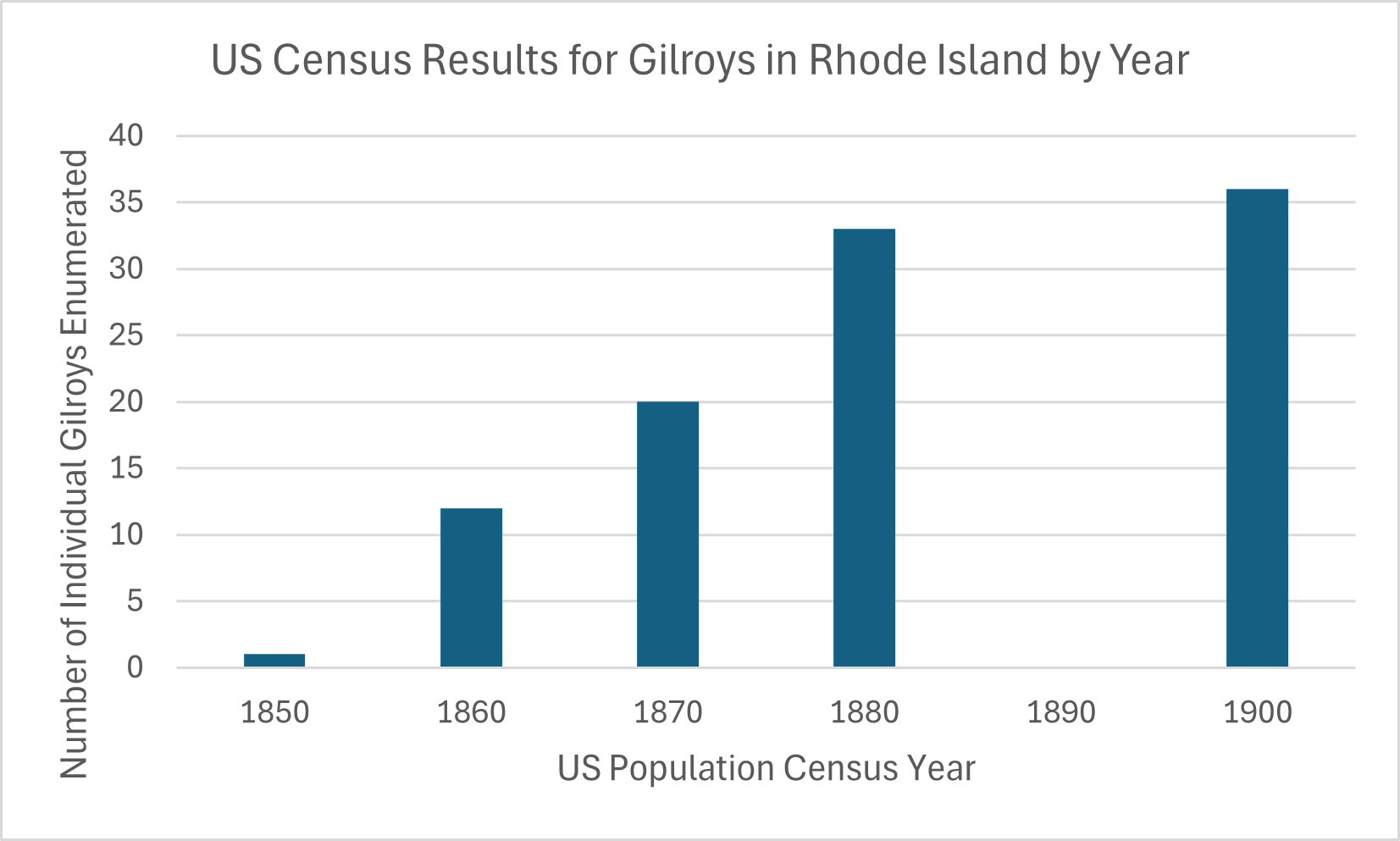
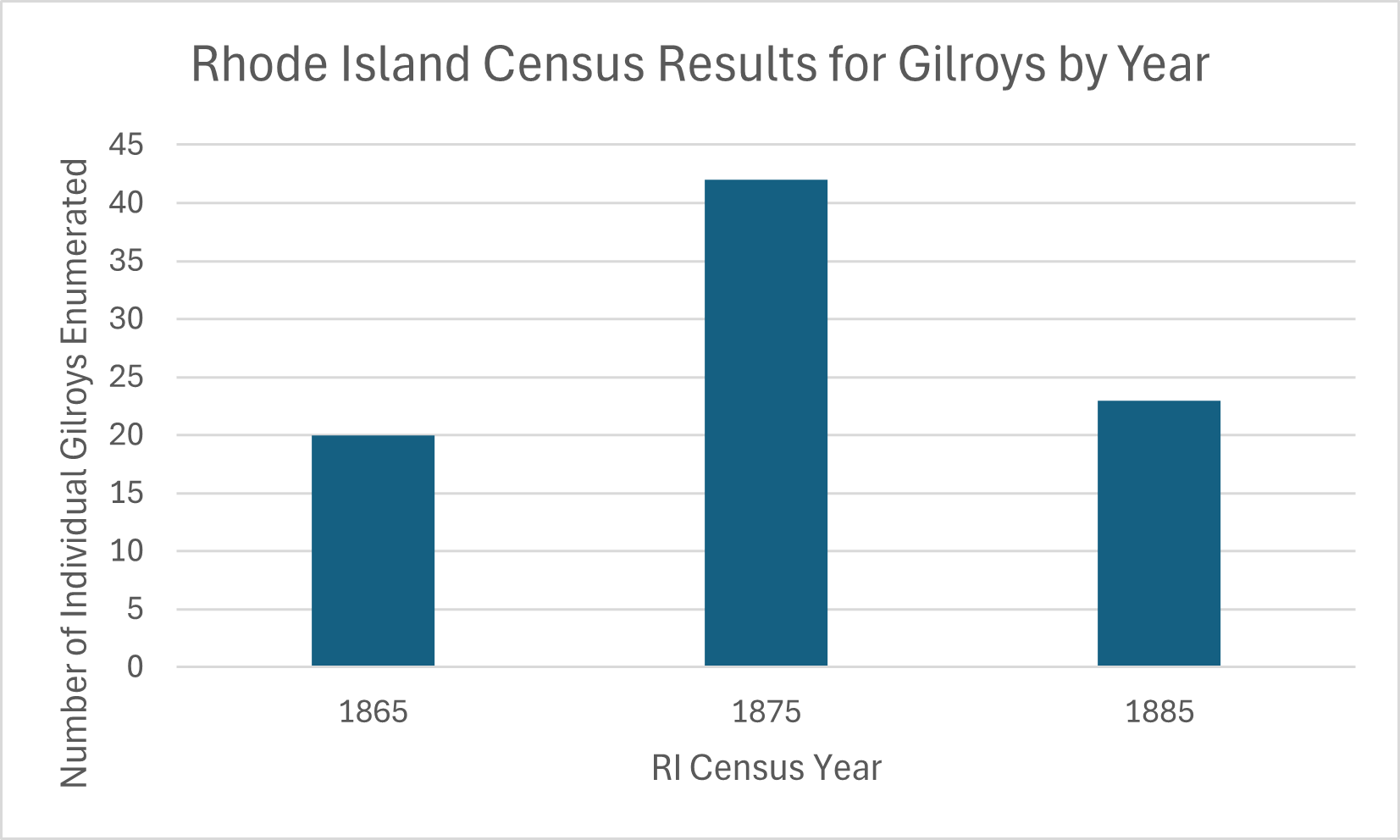
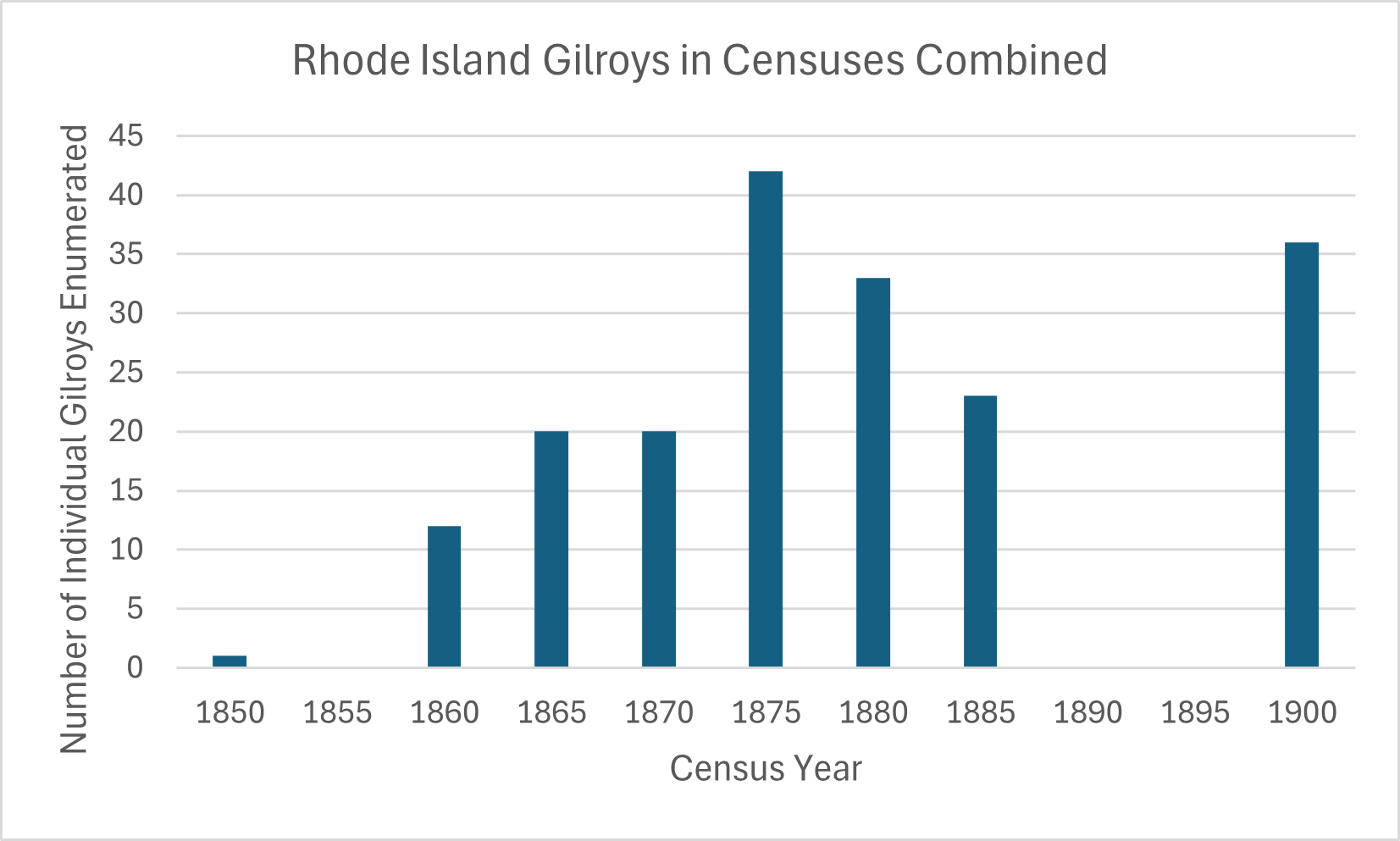
Engineers do enjoy visualizing data, so using Excel, I created a graph of the number of individuals with the exact surname Gilroy or a similar surname for each type of census. Then I combined the number of individuals from both types of censuses, for all available years. Note: the US Census for 1890 and the RI State Census are unavailable.

graph US Census Results for Gilroys in Rhode Island by Year
graph RI Census Results for Gilroys in Rhode Island by Year
graph Census Results for RI Gilroys by Year Combined

The story that I know from my hands-on analysis involves people with the Gilroy name arriving and departing Rhode Island through immigration or moving from or to another state in the US. The number of individuals with the same surname varied by marriage, birth and death. Women would either gain the surname through marriage, or lose it when enumerated using their husband’s surname.

Even though I did collect the citations from Ancestry.com, they are not sufficient for publication and I would have to do some more work to create any citations. There are limits to the approach I used. The enumerators may not have visited all the people who shared that surname, and that different transcription efforts may result in different spelling of the surname.

At the end of this step: I had an Excel spreadsheet, with a worksheet for each census. Each worksheet contained a line for each person who was enumerated in the census as having the exact surname Gilroy or a similar surname that was present in the online databases. Each column in a census worksheet has the same type of data, or was blank, for ease of analysis.

Excel spreadsheet, with a worksheet for each census.

Next, I can use an AI tool to analyze the data in each census, and across censuses. My goal is to identify family groups as well as individuals and track their changes through the years of interest.

Finding WWII Rosters Online at NARA

Blog post Banner  Finding WWII Rosters Online at NARA

For researching a WWI or a WWII soldier, have you considered using the Rosters at NARA? They are located Series: Muster Rolls and Rosters, November 1, 1912–December 31, 1943 within Record Group 64. This blog post will show where to search for rosters, including how to use an online finding aid for finding WWII rosters that will make your task much easier.

The rosters are arranged in three subseries within Muster Rolls and Rosters, November 1, 1912–December 31, 1943:

  • Muster Rolls, November 1, 1912 – June 30, 1918 and Enlisted and Officer Rosters, July 1, 1918 – December 31, 1939,
  • Officer Rosters, 1920 – 1939,
  • Army and Army Air Force (Air Corp) Rosters, 1940 – 1943

The Series is located at: https://catalog.archives.gov/id/85713803

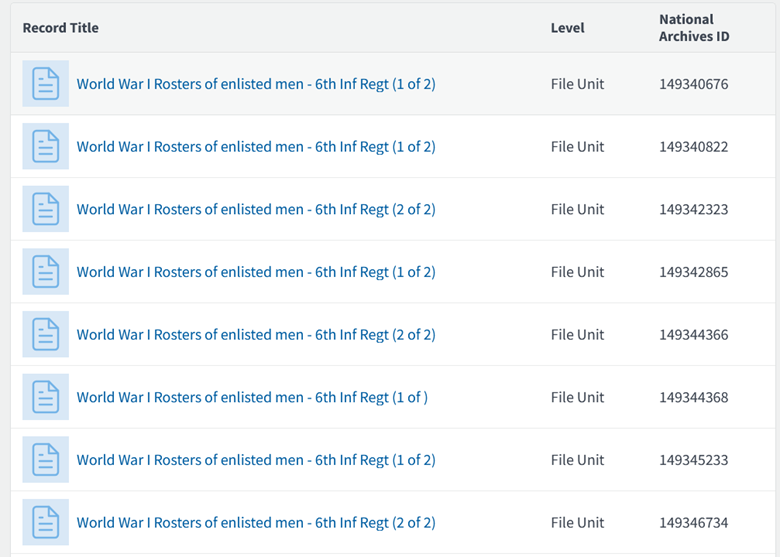
There are 625 pages of links viewing on this Series webpage, so you can browse for an organization.

First page of Series: Muster Rolls and Rosters, November 1, 1912–December 31, 1943

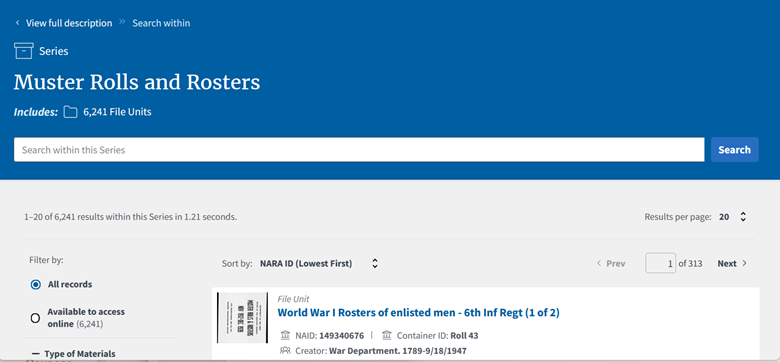
You can also search within the Series for a soldier’s name, military serial number, or even an organization: https://catalog.archives.gov/search-within/85713803

Search within Series: Muster Rolls and Rosters, November 1, 1912–December 31, 1943

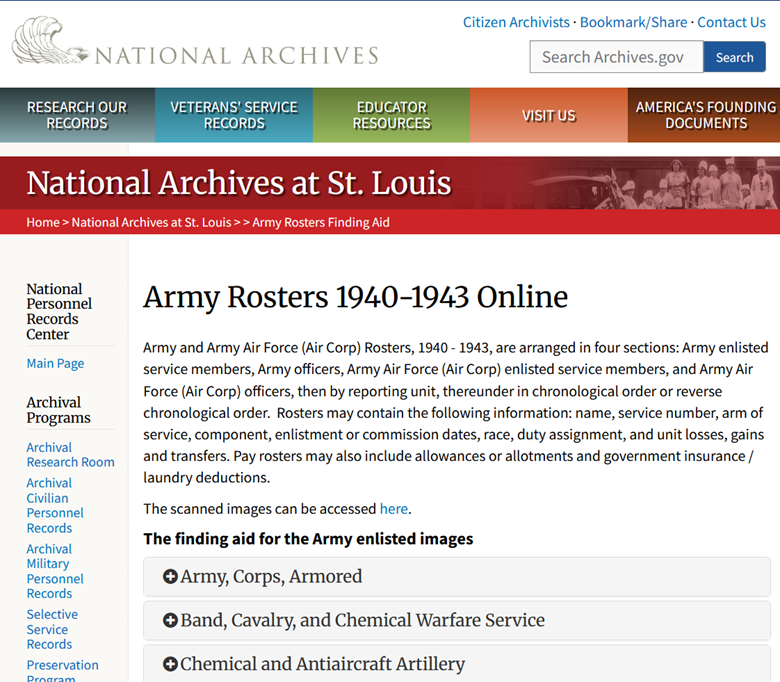
When researching WWII soldiers, there is an online finding aid to streamline the process: https://www.archives.gov/st-louis/archival-programs/army-rosters-1940-1943

Finding Aide for Army Rosters 1940-1943 Online

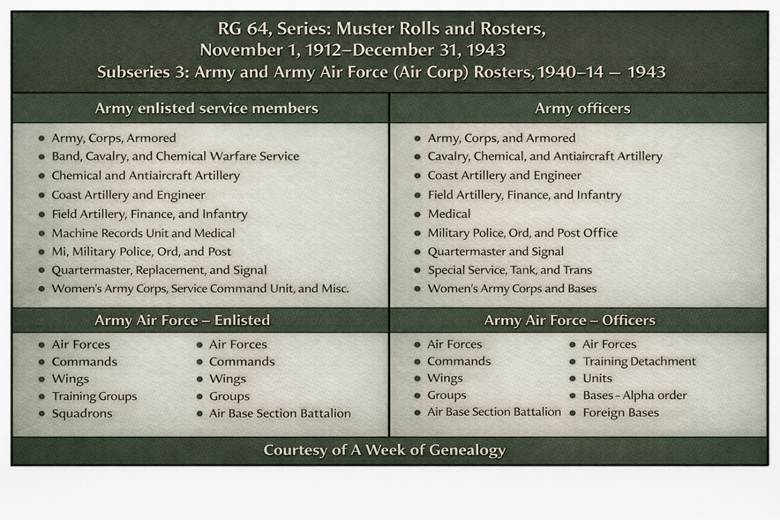
On this page, you will find information about how to locate WWII rosters organized by:

  • Army enlisted service members
  • Army officers
  • Army Air Force (Air Corp) enlisted service members
  • Army Air Force (Air Corp) officers

Within those categories, the rosters are organized by type of reporting unit.

Table for RG 64, Series: Muster Rolls and Rosters, November 1, 1912–December 31, 1943 Subseries 3: Army and Army Air Force (Air Corp) Rosters, 1940 – 1943

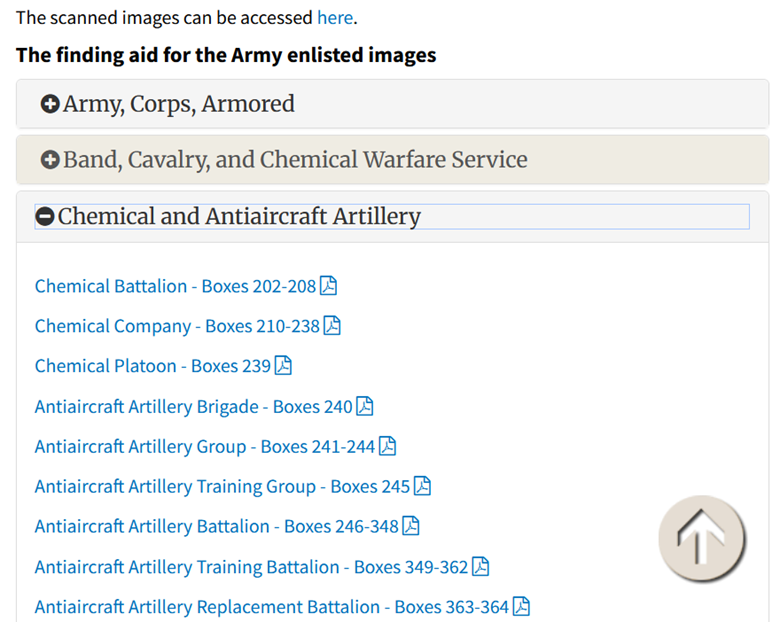
To use the finding aid, click on the plus sign to expand the link to locate the type of unit. There will be box numbers shown, but some entries will contain links to digitized rosters, or to a pdf that contains the National Archives Identifier (NAID) in NARA’s Catalog to use when locating the online rosters.

In this example, I am searching for the rosters for a soldier in Battery A of the 500th AAA Gun Battalion, so clicked on the plus sign next to “Chemical and Antiaircraft Artillery” to expand the section.

Finding aid webpage for AAA Battalion rosters

I licked on the link for “Antiaircraft Battalion – Boxes 246-348.”

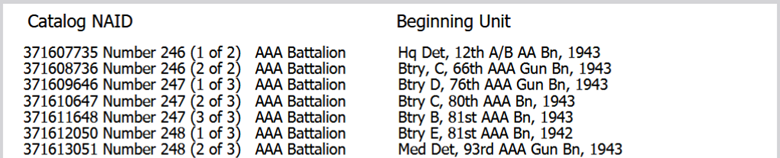
The link led to a PDF file with the Catalog NAID.

https://www.archives.gov/files/antiaircraft-artillery-battalion-index.pdf

The PDF file shows that the rosters are stored by increasing NAID numbers, by the number of the organization.The first page contains the column headers. (They are not repeated on subsequent pages.)

Finding aid file for AAA Battalion rosters

Scrolling down to the beginning of page 4 of the PDF, I find Btry C, 500th AAA Gn Bn, 1943. That means Roll Number 307 (2 of 3), which begins with Battery C of that Battalion has NAID Identifier 371744319.

Finding aid file for 500th AAA Battalion rosters

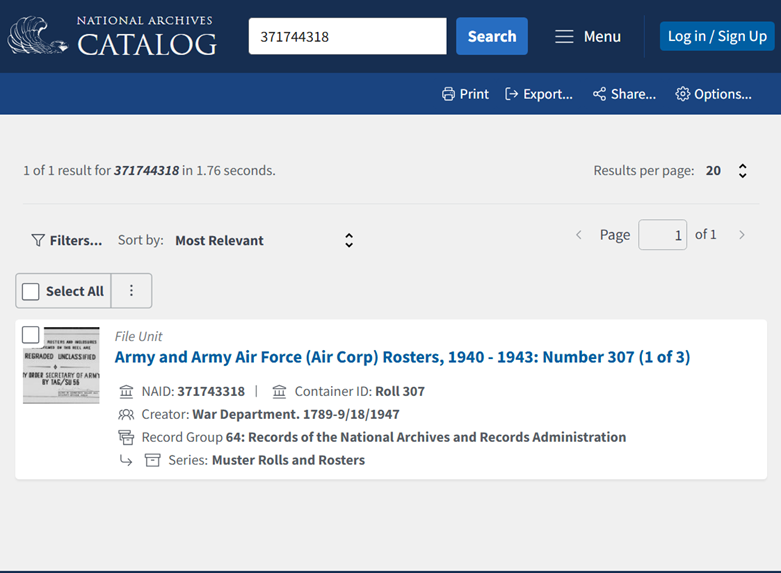
Since the soldier is in Battery A, I will want to check the previous part of the roll, listed at the bottom of page 3 of the PDF, NAID 371744318, Roll Number 307 (1 of 3). I would expect that rosters for Battery A would be closer to the end of the Roll. (Remember to use the Chrome Browser to see the images in order, as Firefox has a documented bug of showing images in reverse order.)

I searched from the NARA Catalog Home Page: https://catalog.archives.gov

Roster Roll for 500th AAA Battalion

There is a blank page between the months, so I began by checking the image after the blank pages in the image range of 800-900.

I recommend building a list or a table with the information for the organization, to keep track of links. (Note: Organization and Link appear in the same column for readability. In my Excel worksheet, they appear in separate columns.)

Table for tracking Roster images, links and dates

I would want to continue to go backwards chronologically to collect the rosters for the time the soldier I am researching was in the Battery.

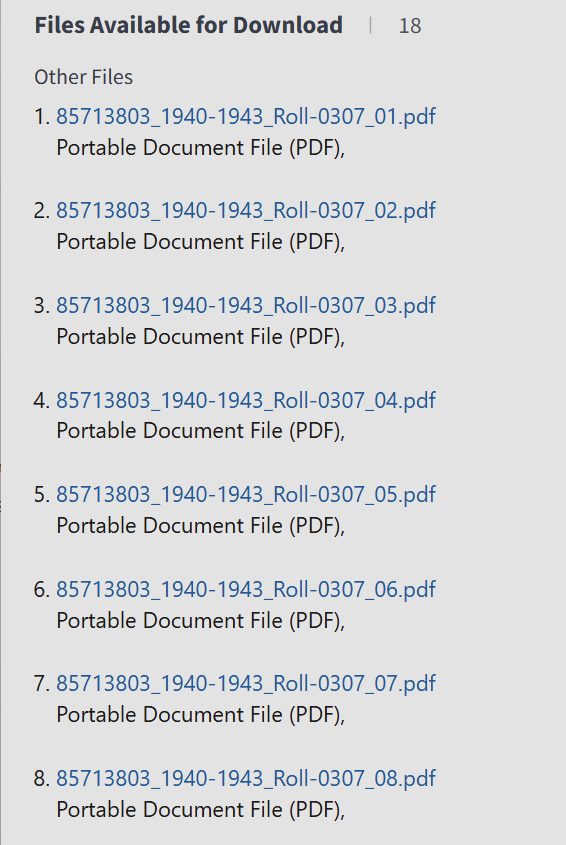
Another option, as described in our blog post about locating WWII Morning Reports in PDF Files can also make the task easier. Search the NARA catalog for: 371745320, which is the NAID for the final part of the Roll Number 307, part 3 of 3.

PDF files of images available for download

From there, the PDF files containing groups of 125 images from the Roll can be downloaded. Images for Battery A can be found in the files Roll-0307_07.pdf and Roll-0307_08.pdf

Give it a try and let me know how you do!

Now Open: “Tracing Your New York Ancestors with the NYG&B”

Are you researching Ancestors in New York State? If so, you will probably be interested in the free on-demand online course from The New York Genealogy & Biographical Society: “Tracing Your New York Ancestors with the NYG&B.”

In the six video sessions of the course, you will learn about NYG&B, its services, membership and publications. The sessions cover the use of their online collections.

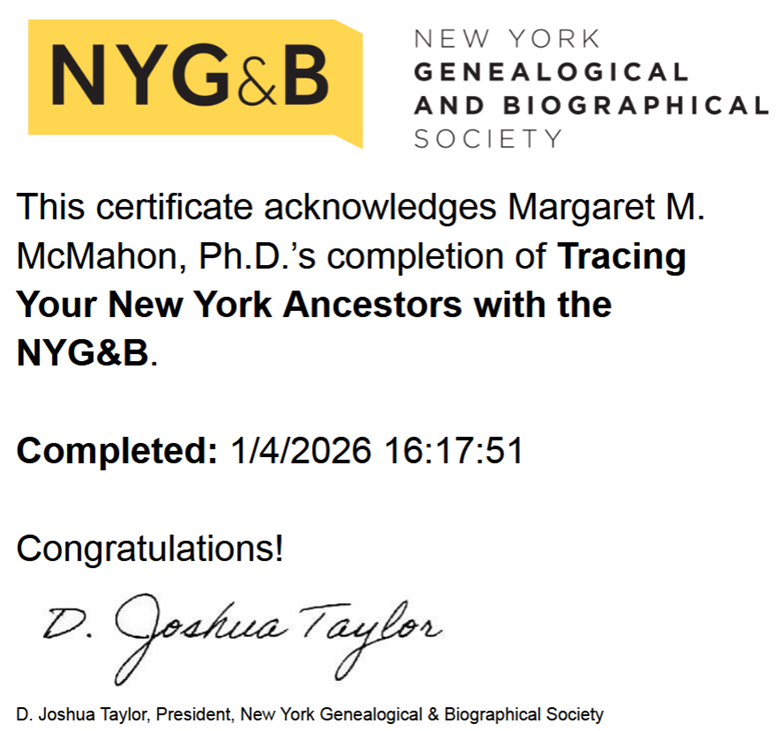
When you sign up for the course, you have 60 days to complete it. During that time you can review the on-demand lectures and revisit the materials. When the 60 days expires, you can re-register for the course again. When you complete the videos for all the sessions you can enter your name to receive a personalized digital certificate.

NYG&B Certificate

The opportunity to learn about the resources of the NYG&B through the sessions given by their esteemed experts is terrific. The information that I found most interesting were about the resources available on their website, addressing how to navigate their website and ways to search their databases. The demonstration of how to search their collections through the New York Public Library catalog were invaluable.

It was fascinating to learn about the products created by the scholars in residence, who have created work about the resources at the NYG&B. Those products are available on the website, and might be leveraged in our own research.

Insights into the educational programs and how to use the tools were also important parts of the course. Be sure to download the handouts that accompany each class.

You can register for the online course, as well as learn about the sessions and presenters at: https://www.newyorkfamilyhistory.org/tracing-your-new-york-ancestors-nygb-registration

Surname Study and AI Part 1: The Approach

log banner - Blog Post Surname and AI 1

This blog post begins a series of posts exploring an ongoing surname study and my recent use of artificial intelligence (AI) in it. In this post, I will describe the history of getting to this point in my efforts.

Over the course of several years, I have been working on a surname study. My goal was to find out if and how families who lived in Rhode Island from 1850-1900 were connected. Chain migration to the United States from Ireland was entirely likely, and by connecting these family units I could potentially research collateral relatives to learn more about the family unit(s) back in Ireland.

Using what I had learned from researching my direct ancestors, these were the parameters:

  • Surname: Gilroy
  • Place: Rhode Island, US
  • Timeframe: 1850-1900

For this project, I collected both federal and census data to use as the backbone of the research. Then I built upon the intermediate years using vital records. I faced some challenges when collecting the data. At that time, Rhode Island Censuses and vital records were obtained by mailing requests to an incredibly helpful and knowledgeable staff at the Rhode Island State Archives. Copies of the records were available for modest fees, but you did require data about the record you sought. (Contrast that with the ability to search for everyone with the same or similar name in a record set through a digital database.) At the time that meant that some of the names came from index-only databases as place holders until copies of the original records could be found. An index of vital records for the state was available on Ancestry, as were a composite of indexed city directories which formed an 1890 US Census substitute.

Another challenge was correlating dissimilar data. Just as every federal census asks different questions, so does every state census. Vital records change what data is recorded over time, too. The data found in city directories is also different from the other records, containing addresses and occupations but lacking explicit family connections.

My main product was an Excel spreadsheet with tabs for the data collected from each record type by year. I worked to reconcile the different data collected from similar record types. From that spreadsheet, I extracted family units, capturing them in PowerPoint to visually show how the family units changed over time. This gave me some insights but was labor intensive. I contemplated my next steps, knowing that analyses of ages, appearances of people with the same surnames in Rhode Island, and child naming patterns, as well as mapping the neighborhoods were among them.

Fast-forward to now, when more records are available online. For example, in addition to the vital record indexes, images of the RI vital record ledgers are now online. The Rhode Island state censuses are also online. And then there is AI to help with formatting, visualizing and analyzing data.  

Some challenges still exist. There were gaps in census coverage, due to the 1890 US Population Census and the 1895 Rhode Island Census no longer being available. The use of other record types will help to fill in the census gaps. A state-specific challenge is the fact that the 1885 Rhode Island Census is available as an alphabetized index of names, requiring family units to be connected using data in the “Family Number” column.

The state of AI is constantly changing, but I decided to investigate how AI could help this the collection and analysis of data. 

I did try an analysis of the whole spreadsheet in ChatGPT, and I had been able to create family groups and use them to discriminate between some people who had the same name. However, the data was not combined in an efficient manner, and rather than have one large spreadsheet, I decided it would be more understandable to break the data into more manageable pieces, based on the record types. The composite spreadsheet was broken down into different spreadsheets: (1) censuses, (2) births, marriages, and deaths and (3) city directories. I also decided to use AI to help with the data collection process, the analysis and different ways to visualize the data.

At the end of this step: I had a basic plan to redo the data collection, collect additional data that had become available online, and developed ideas on how AI could support this study. The next step will be to use only census date and have AI create the backbone of a timeline for the individuals and families.

Book Review: Your Stripped Bare Guide

blog banner - Book Review Your Stripped Bare Guide

Having earned a Ph.D., worked as a professor, and published research, I know that citing sources is essential in academic work. Having published in multiple disciplines, I have used different styles of citations and variations of those styles. Students can usually understand why direct quotations need to be cited, but do not always grasp why the facts they use in their writing must also be attributed. The methods in technical papers are explained so that they can be reproducible. For a technical discipline, citations can be used by readers to go upstream to the authoritative sources and investigate the source material for themselves. Those sources are typically published and readily accessible.

Genealogical writing is different. Using historical sources can be far more complicated. They are evidence of the past events, which support interpretations of that past. The access to an historical source may limited. A source may exist in one location with restrictions limiting its physical access, which means that readers may not be able to examine the source themselves. A source may have been destroyed or lost, leaving us with only an image or description of it. It may exist only in the private files of a researcher or in unpublished manuscripts. Primary sources may also be subjective, which introduces another layer of evaluation. Therefore, citations of historical sources need to convey to readers the information about the source and the implications about its reliability.

This is where Your Stripped Bare Guide to Citing & Using History Sources becomes invaluable. Ms. Mills wants us to understand why and how to do this effectively. Improving how we cite our sources will result in better products. As we evaluate our sources our citations present evaluation of their reliability to others. She guides us as we turn our evidence into proof.

There are sobering thoughts throughout this book. Without DNA evidence, attributing relationships between individuals in the past is built on trust in the informants. The authenticity of a tombstone image downloaded from an online cemetery website differs from that of an image we photographed on our own in-person visit to a cemetery.

All sources are not created equal, nor do all have the same weight when considered as proof. From the very start of our research, we need to not only be tracking where our sources come from but evaluating them as we collect them. We must also be wary of bad data; multiple references to it should not be mistaken for proof of its veracity. There is a good reminder to put full citations on the front page of all our notes or copies of documents.

Enjoy the guidelines for analyzing evidence. The book also includes universal templates and construction notes for our use, including templates for the daunting layered citations with an explanation of why they are important. While you might be tempted to ignore Appendix One until you need to define terms, I recommend that you review it early to make sure that you understand the language of citing and using historical sources. (The first term you look up should be “q.v.”)

Consider allowing Ms. Mills to guide you toward stronger, clearer, more reliable research!

The book can be found at: https://genealogical.com/store/your-stripped-bare-guide-to-citing-using-history-sources/

Note: A review copy was provided by the publisher.